A seatbelt
for your data
JOLDISK is a data security service that brings together discovery and classification of protected data, encryption, and data security posture management. Individuals and organizations of up to 20 users can use it for free.

Data security from discovery to posture management
Discover
The list, levels, and classifications of protected data stored in the secure area are collected automatically.
Auto-classification suggestions
Classify
Assign three security attributes (level, compartment, and distribution control) and CUI Registry-based categories. Word documents receive CUI markings.
Document marking
Protect
Protection stays with a file even when it leaves the secure area, and only authorized users can open it.
Print protection, removable media control
Manage posture
Review level distribution, unprotected data, exposure, risky documents, and access history in one place.
Data access history
Three principles: level, compartment, and distribution control
JOLDISK assigns three security attributes to each piece of data: level, compartment, and distribution control. Even when a file leaves the secure area, only users who meet all three conditions can open it.
The sensitivity of the data. Users can open a document when their clearance is at or above the document level. Level names and colors are set in the organization's level table.
A division based on need-to-know. Even at the same level, documents in a project or task compartment can be opened only by users authorized for that compartment.
Assign recipients and a validity period to documents sent outside or to specific people. Only those recipients can open them within the period, sent documents can be recalled, and views are recorded.
Protection for each data leak path
Secure Disk
All work is done in a designated secure area, and files are encrypted automatically when saved. With document centralization, shared and personal folders on the organization's NAS can serve as the secure area.
Screen protection
A screen watermark shows the viewer and viewing time, and screen capture is blocked while protected documents are open. The screen locks automatically after a period of inactivity.
Print protection
Printouts carry a watermark and classification banners, and print history is recorded.
Removable media control
Writing is allowed only to authorized media. Writing to other USB drives, external storage, and CD/DVD is blocked.
Clipboard protection
Controls pasting content from protected documents into other places.
Export records
Export history is recorded in the data access history.
Data Security Posture Management (DSPM)
Review the risk of protected data in the secure area through metrics, and recommend actions to data owners.
For risky documents, actions are recommended to the data owner.
Sample screen (demo organization data)
Data access control for AI agentsBETA
AI agents such as Claude Code and Codex cannot open protected files directly, and their access is limited to permitted levels and compartments. This keeps a balance between using data and protecting it.
Shared organization features
Organization accounts can use electronic approval, document centralization, folder handover, and more, based on the org chart.
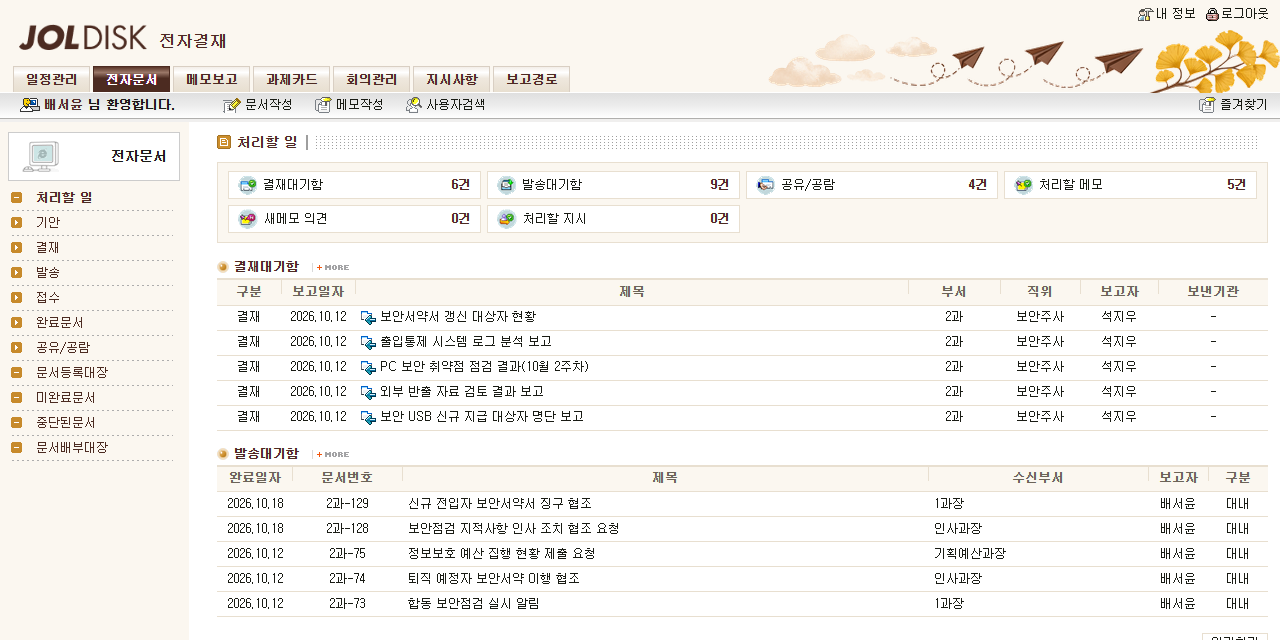
Actual electronic approval screen (demo organization data)
Aligned with CMMC and Zero Trust
NIST SP 800-171 security controls
Supports CUI Registry-based categories and classification banners on printouts, and helps meet 18 NIST SP 800-171 security requirements.
Data-centric security
Supports the Data Pillar of Zero Trust architecture through data-centric security.
Validated cryptographic modules
Cryptographic operations for files and communications are performed in NIST CMVP-validated cryptographic modules (FIPS 140).
JOLDISK helps meet security controls and does not replace certification (assessment).
Use cases by sector
Security audits and CMMC readiness
Provides features related to Korean defense security audit items and the CMMC Level 2 access control, media protection, and audit requirements.
Protecting research outputs
Manage research data and project reports by level, and share them with external collaborators as distribution copies with a validity period.
Protecting key assets
Contracts, plans, and source code stored on the Secure Disk are encrypted automatically.
Pricing
- Individuals, organizations up to 20 users
- Includes ads
- 2 devices per user
- Up to 20 users
- No ads
- 2 devices per user
- Organizations of 21-50 users
- No ads
- 5 devices per user
- Consulting included
Defense and defense-industry security expertise
Team credentials
- CMMC RPA, CMMC RP
- CISSP
- ISO 27001, 27701, 42001
Awards
- DAPA Minister's Commendation (defense technology protection)
- NIS Director's Commendation (national counterintelligence)
- Minister of Science and ICT Commendation
- Defense Security Institute Director's Commendation (outstanding paper)
Peace of mind, for your data too.
After installation, your Secure Disk is ready as soon as you log in.